
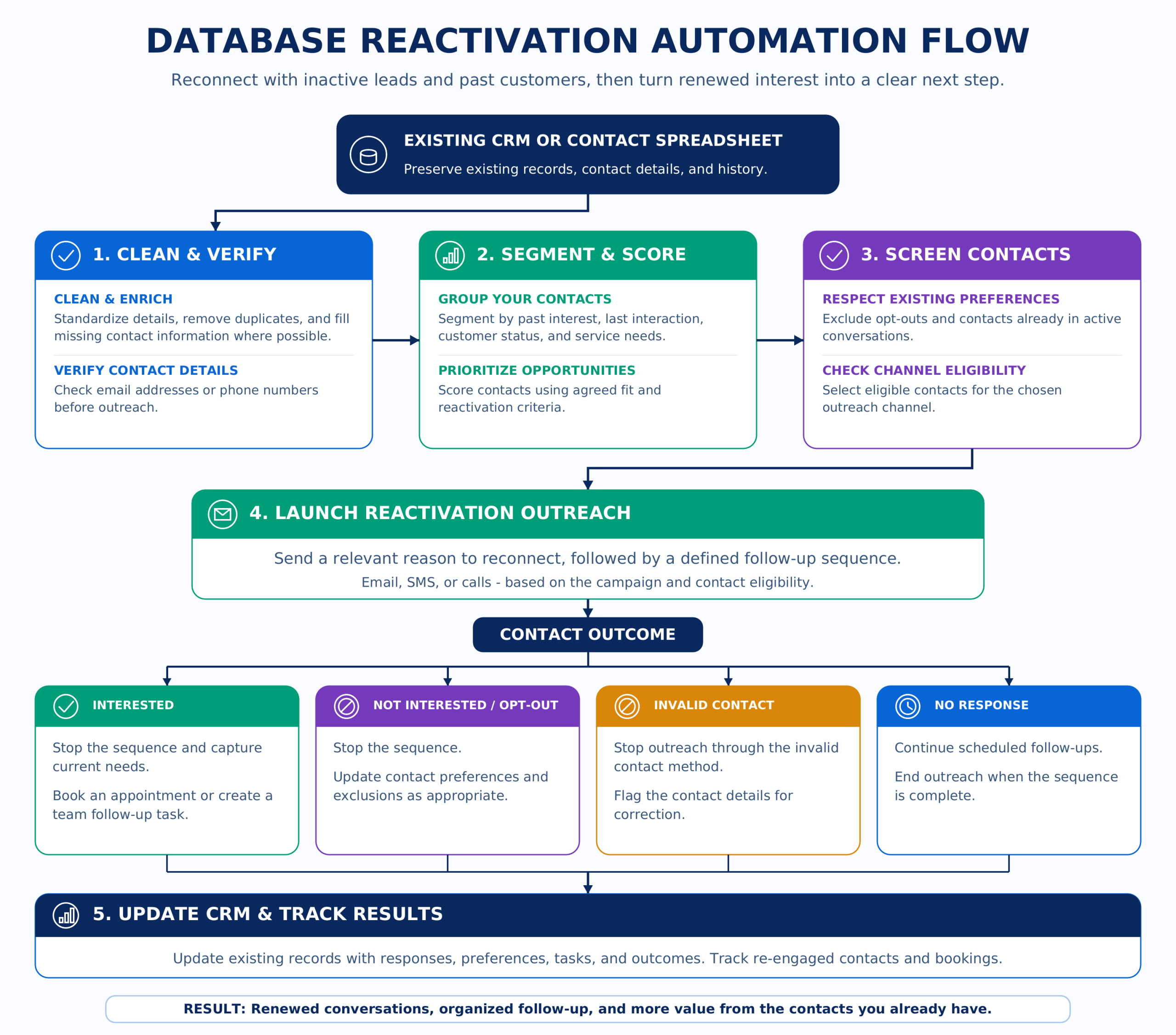
Database reactivation at a glance
Work the list you already paid to build
What database reactivation can do
Give past leads a reason to come back
Find the contacts worth revisiting, reach out with a relevant message, and surface the people who re-engage.
- Select past leads or customers using service, source, status, recency, or other CRM data
- Segment contacts so different groups can receive the right message or offer
- Exclude opt-outs, bounced addresses, active opportunities, and other records that should stay out
- Update existing CRM records instead of creating duplicate contacts
- Send approved re-engagement messages through the appropriate channel
- Personalize the next step based on the contact’s segment or previous interaction
- Stop automated follow-up when someone replies, books, opts out, or no longer qualifies
- Notify the right person when a past contact becomes active again
- Create the appropriate follow-up task, booking path, or handoff
- Keep outreach, responses, status changes, and stop reasons attached to the existing record
Only include people who still belong in the audience
Use a message or offer that matches why they were in the database
Stop when someone replies, books, opts out, or should no longer continue
Move re-engaged contacts back to the right person on your team
WHAT GOES INTO A REACTIVATION BUILD
From dormant contacts to a working re-engagement system
Select
Choose who should be included before anything is sent.
- Audience rules and exclusion criteria
- Segmentation by service, status, recency, or source
- Offer and message strategy for each group
Engage
Restart the conversation with the right message and next step.
- Approved re-engagement messaging
- CRM matching so existing records are updated
- Reply, booking, opt-out, and bounce stop conditions
Handoff
Surface the people who re-engage and keep the process visible.
- Notify the right owner when someone responds
- Create the appropriate task, booking path, or next action
- Log sends, responses, status changes, and stop reasons
Launch
Test the full workflow and hand over a system your team can run.
- End-to-end testing with realistic contact scenarios
- Documentation and team handoff
- Optional monitoring, maintenance, and ongoing improvements
REACTIVATION IN PRACTICE
What a reactivation workflow can look like
Different contacts need different paths. These examples show how segmentation, exclusions, outreach, and human handoff can work together.
Past Lead Re-Engagement
- Re-engaged lead reaches a person.
Audience Cleanup
- Only appropriate contacts move into reactivation.
Reopened Conversation
- Your team takes over with the full history and context.
DATABASE REACTIVATION FAQ
What to know before restarting old conversations
The practical details behind preparing the database, choosing audiences, organizing follow-up, and keeping the CRM current.
Does the database need to be cleaned up before we start?
Not necessarily. Cleanup can be part of the workflow. We can identify duplicates, incomplete records, outdated statuses, and other issues before deciding which contacts should move into a reactivation audience.
Can different groups receive different reactivation messages?
Yes. Contacts can be segmented by factors such as previous service, lead source, status, location, age of the inquiry, or other useful CRM data. Each group can then follow a different message or next-step path.
What if our CRM data is missing important information?
The workflow can identify which records are incomplete and decide how they should be handled. Some information may be recoverable from connected systems or approved enrichment sources, while other records can simply be held back for review.
Can we start with only part of the database?
Yes. A reactivation build does not have to begin with every dormant record at once. You can start with a specific segment, service, time period, or lead type and expand the process after you see how that audience behaves.
Can someone review contacts before reactivation begins?
Yes. A human approval step can be included before contacts enter outreach. The system can prepare the audience and hold it for review so your team can approve, remove, or adjust records before anything moves forward.
How do reactivated leads get prioritized?
You can define rules for what should receive attention first. For example, a recent high-value inquiry may be handled differently from a much older contact with limited history. Those rules can determine ownership, notifications, tasks, or the next action.
How do we know whether the reactivation workflow is working?
The workflow can keep track of useful outcomes such as replies, bookings, handoffs, opt-outs, stopped sequences, and other status changes. That gives you a clearer picture of which segments and approaches are creating renewed conversations.
Is database reactivation a one-time project or something we can run again?
It can be either. Some businesses may want a one-time cleanup and re-engagement campaign, while others may want a repeatable process that periodically identifies newly dormant contacts and prepares them for another appropriate reactivation cycle.